Joins
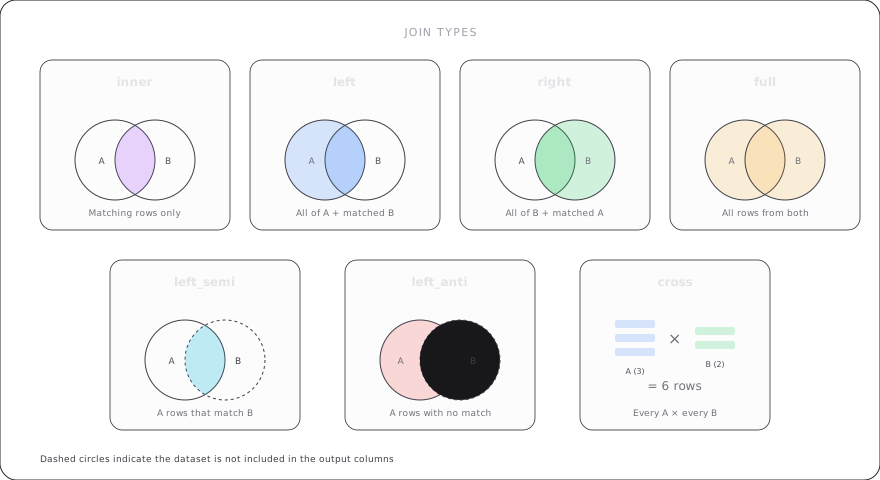
The join transformation combines datasets by matching rows across two or more assets. Teckel supports seven join types and multi-way joins in a single transformation step.
Schema
- name: <AssetRef>
  join:
    left: <AssetRef>
    right: <NonEmptyList[JoinTarget]>
| Field | Type | Required | Description |
|---|---|---|---|
left | AssetRef | Yes | Left-side asset. |
right | NonEmptyList[JoinTarget] | Yes | One or more join targets. |
JoinTarget object:
| Field | Type | Required | Description |
|---|---|---|---|
name | AssetRef | Yes | Right-side asset. |
type | string | Yes | Join type (see below). |
on | List[Condition] | Yes | Join conditions. Must be [] for cross joins. |
Join Types
Teckel supports these seven join types:
| Type | Description |
|---|---|
inner | Only rows with matches in both sides. |
left | All left rows; right columns are NULL for non-matches. |
right | All right rows; left columns are NULL for non-matches. |
outer | All rows from both sides; NULLs for non-matches on either side. |
cross | Cartesian product of both sides. on must be []. |
left_semi | Left rows that have at least one match in right. Only left columns returned. |
left_anti | Left rows with no match in right. Only left columns returned. |
Join Conditions
Conditions are boolean expressions comparing columns from the left and right assets. Column references must be qualified with the asset name to avoid ambiguity.
on:
  - "employees.dept_id = departments.dept_id"
  - "employees.start_date >= departments.valid_from"
The equality operator is = (single equals), consistent with ANSI SQL. The == form is accepted as an alias.
Multiple conditions in on are combined with AND — all must be true for a row to match.
Examples
Inner Join
Return only employees that have a matching department:
transformation:
  - name: employeesWithDept
    join:
      left: employees
      right:
        - name: departments
          type: inner
          on:
            - "employees.dept_id = departments.id"
Left Join
Keep all employees, filling NULL for those without a department:
transformation:
  - name: allEmployees
    join:
      left: employees
      right:
        - name: departments
          type: left
          on:
            - "employees.dept_id = departments.id"
Right Join
Keep all departments, even those with no employees:
transformation:
  - name: allDepartments
    join:
      left: employees
      right:
        - name: departments
          type: right
          on:
            - "employees.dept_id = departments.id"
Outer (Full) Join
Keep all rows from both sides:
transformation:
  - name: fullMatch
    join:
      left: employees
      right:
        - name: departments
          type: outer
          on:
            - "employees.dept_id = departments.id"
Cross Join
Cartesian product — every row from the left paired with every row from the right. The on list must be empty:
transformation:
  - name: allCombinations
    join:
      left: sizes
      right:
        - name: colors
          type: cross
          on: []
Left Semi Join
Return employees that exist in the active list, but only keep columns from employees:
transformation:
  - name: activeEmployees
    join:
      left: employees
      right:
        - name: activeList
          type: left_semi
          on:
            - "employees.id = activeList.employee_id"
Left Anti Join
Return employees that are NOT in the termination list:
transformation:
  - name: currentEmployees
    join:
      left: employees
      right:
        - name: terminations
          type: left_anti
          on:
            - "employees.id = terminations.employee_id"
Multi-way Joins
Multiple entries in right are applied sequentially left to right. Each join takes the accumulated result of previous joins as its left side.
transformation:
  - name: enrichedOrders
    join:
      left: orders
      right:
        - name: customers
          type: inner
          on:
            - "orders.customer_id = customers.id"
        - name: products
          type: left
          on:
            - "orders.product_id = products.id"
This is equivalent to: (orders INNER JOIN customers) LEFT JOIN products.
Tip: Multi-way joins are processed in the order listed. The second join condition can reference columns from the first join's result. Plan your join order to match your data model.
Duplicate Column Handling
When a join produces columns with the same name from both sides, both columns are preserved, qualified with their source asset name (e.g., employees.name and departments.name).
To resolve duplicates, follow the join with a select transformation:
transformation:
  - name: joined
    join:
      left: employees
      right:
        - name: departments
          type: inner
          on:
            - "employees.dept_id = departments.id"

  - name: cleaned
    select:
      from: joined
      columns:
        - "employees.name as employee_name"
        - "departments.name as dept_name"
        - "employees.salary"
Tip: Always qualify column references in join conditions. Unqualified references like
"id = id"will produce errorE-JOIN-001for ambiguity.
As-of Join (8.39)
New in v3.0.
Temporal join that matches each left row with the closest right row by an ordered column (typically a timestamp). This is commonly used in financial and time-series data where you want to match events with the most recent preceding reference data.
Schema:
| Field | Type | Required | Default | Description |
|---|---|---|---|---|
left | AssetRef | Yes | -- | Left asset. |
right | AssetRef | Yes | -- | Right asset. |
leftAsOf | Column | Yes | -- | Left temporal/ordered column. |
rightAsOf | Column | Yes | -- | Right temporal/ordered column. |
on | List[Condition] | No | [] | Additional equi-join conditions. |
type | "inner" or "left" | No | "left" | Join type. |
direction | "backward" or "forward" or "nearest" | No | "backward" | Match direction. |
tolerance | Expression | No | -- | Maximum allowed distance between as-of values. |
allowExactMatches | boolean | No | true | Whether exact matches are included. |
Directions:
backward-- match the latest right row whererightAsOf <= leftAsOf.forward-- match the earliest right row whererightAsOf >= leftAsOf.nearest-- match the closest right row by absolute distance.
Example -- match trades with the most recent quote:
transformation:
  - name: tradeWithQuote
    asOfJoin:
      left: trades
      right: quotes
      leftAsOf: trade_time
      rightAsOf: quote_time
      on:
        - "trades.symbol = quotes.symbol"
      direction: backward
      tolerance: "INTERVAL 5 MINUTES"
Example -- forward-looking join for next event:
transformation:
  - name: withNextEvent
    asOfJoin:
      left: actions
      right: events
      leftAsOf: action_time
      rightAsOf: event_time
      direction: forward
Tip: Use
toleranceto limit how far back (or forward) the join looks for a match. Without it, the join matches the closest row regardless of distance.
Lateral Join (8.40)
New in v3.0.
Correlated join where the right side may reference columns from the left side. This is similar to SQL's LATERAL JOIN or CROSS APPLY.
Schema:
| Field | Type | Required | Default | Description |
|---|---|---|---|---|
left | AssetRef | Yes | -- | Left asset. |
right | AssetRef | Yes | -- | Right asset (may reference left columns). |
type | "inner" or "left" or "cross" | No | "inner" | Join type. |
on | List[Condition] | No | [] | Additional join condition. |
Example -- lateral join with a correlated subquery:
transformation:
  - name: withLatest
    lateralJoin:
      left: customers
      right: latestOrders
      type: left
      on:
        - "customers.id = latestOrders.customer_id"
Tip: Lateral joins are useful for "top-N per group" patterns and for joining with table-generating functions where the right side depends on values from the left.