Data pipelines,
declared in YAML.
Teckel is a declarative language for building ETL pipelines. Describe your sources, transformations, and outputs — the runtime handles execution.
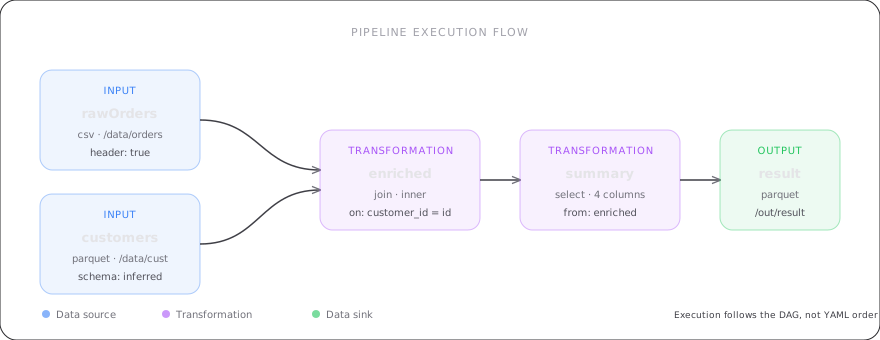
Write pipelines, not glue code
A complete Teckel document reads a CSV, joins it with another dataset, selects columns, and writes Parquet — all in under 30 lines of YAML.
- 45 transformation types
- SQL-like expression language
- Declarative data quality checks
- Runtime-agnostic specification
version: "3.0"

input:
  - name: orders
    format: csv
    path: "data/orders.csv"
    options:
      header: true

  - name: customers
    format: parquet
    path: "data/customers.parquet"

transformation:
  - name: enriched
    join:
      left: orders
      right:
        - asset: customers
          type: inner
          condition: "orders.cid = customers.id"

  - name: summary
    select:
      from: enriched
      columns:
        - "customer_id"
        - "upper(name) as name"
        - "amount"
        - "order_date"

output:
  - name: summary
    format: parquet
    path: "out/summary"
    mode: overwrite
Everything you need in a pipeline language
45 Transformations
Select, filter, join, group, window, pivot, merge, as-of join, grouping sets, NA operations, and more. Every operation is a YAML key.
Expression Language
SQL-like expressions for computed columns, conditions, and aggregations. CASE, CAST, nested functions — all inline.
Data Quality
Declarative quality suites with completeness, uniqueness, validity, freshness, referential integrity, and more.
Runtime Agnostic
The specification is not tied to any engine. Reference implementation on Apache Spark, designed for DuckDB, Polars, and others.
Metadata & Governance
Pipeline ownership, tags, lineage tracking, exposures, catalog integration, and column-level documentation.
Variables & Secrets
Parameterize pipelines with variables and environment overrides. Secrets are declared in YAML and resolved at runtime.
Start building pipelines
Read the documentation, explore the specification, or dive into the reference implementation.