Advanced Transformations
This section covers specialized transformations: raw SQL, SCD Type 2, API enrichment, schema enforcement, data assertions, partitioning, and custom components.
SQL (8.22)
Executes a raw SQL query against one or more assets registered as temporary views.
Schema:
| Field | Type | Required | Description |
|---|---|---|---|
query | string | Yes | SQL query string. |
views | NonEmptyList[AssetRef] | Yes | Assets to register as temporary views before query. |
All assets listed in views are registered as temporary views using their asset name as the view name. The SQL dialect is implementation-defined (e.g., Spark SQL for the Spark runtime).
Example — complex query across multiple assets:
transformation:
  - name: customerOrders
    sql:
      views: [customers, orders]
      query: >
        SELECT c.name, o.order_id, o.amount
        FROM customers c
        LEFT JOIN orders o ON c.id = o.customer_id
        WHERE o.amount > 100
Example — using SQL for complex aggregation:
transformation:
  - name: monthlyStats
    sql:
      views: [transactions]
      query: >
        SELECT
          date_trunc('month', txn_date) as month,
          count(*) as total_txns,
          sum(amount) as total_amount,
          percentile_approx(amount, 0.5) as median_amount
        FROM transactions
        GROUP BY date_trunc('month', txn_date)
        ORDER BY month
Tip: Use
sqlwhen the built-in transformations do not cover your use case, or when porting existing SQL logic into a Teckel pipeline.
SCD Type 2 (8.25)
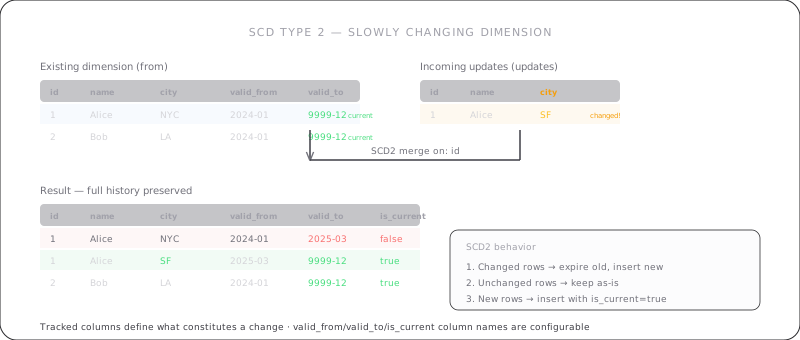
Slowly Changing Dimension Type 2 — tracks historical changes to dimension records. This transformation takes two inputs rather than a single from.
Schema:
| Field | Type | Required | Description |
|---|---|---|---|
current | AssetRef | Yes | Existing dimension table (previous state). |
incoming | AssetRef | Yes | New/updated records to merge. |
keyColumns | NonEmptyList[Column] | Yes | Business key columns for matching records. |
trackColumns | NonEmptyList[Column] | Yes | Columns to track for changes. |
startDateColumn | string | Yes | Name for the valid-from timestamp column. |
endDateColumn | string | Yes | Name for the valid-to timestamp column. |
currentFlagColumn | string | Yes | Name for the is-current boolean column. |
How it works:
- Match
incomingrecords tocurrentrecords bykeyColumns. - For matched records where any
trackColumnsvalue has changed:- Close the existing record: set
endDateColumnto current timestamp,currentFlagColumntofalse. - Insert a new record from
incoming:startDateColumn= current timestamp,endDateColumn=NULL,currentFlagColumn=true.
- Close the existing record: set
- For matched records with no changes: no modification.
- For new records (no match in
current): insert withstartDateColumn= current timestamp,endDateColumn=NULL,currentFlagColumn=true. - Output is the full dimension table (all historical + current records).
Example — customer dimension with history tracking:
transformation:
  - name: customerDim
    scd2:
      current: existingCustomers
      incoming: newCustomerData
      keyColumns: [customer_id]
      trackColumns: [name, email, address]
      startDateColumn: valid_from
      endDateColumn: valid_to
      currentFlagColumn: is_current
Tip: Ensure
currentcontains the full dimension table from the previous run, including all historical records. The output replaces the entire dimension.
Enrich (8.26)
Enriches records by calling an external HTTP API for each distinct key value.
Schema:
| Field | Type | Required | Default | Description |
|---|---|---|---|---|
from | AssetRef | Yes | — | Source asset. |
url | string | Yes | — | API endpoint URL. May contain ${keyColumn} placeholder. |
method | string | No | "GET" | HTTP method. |
keyColumn | Column | Yes | — | Column whose value is sent to the API. |
responseColumn | string | Yes | — | Name for the column holding the API response. |
headers | Map[string, string] | No | {} | HTTP request headers. |
onError | string | No | "null" | Error handling: "null", "fail", or "skip". |
timeout | integer | No | 30000 | Request timeout in milliseconds. |
maxRetries | integer | No | 3 | Max retry attempts for 5xx/timeout errors. |
Key behaviors:
- The API is called once per distinct value of
keyColumn. Results are cached and reused for duplicates. - The response body is stored as a string in
responseColumn. - HTTP 4xx errors are not retried. HTTP 5xx and timeouts are retried with exponential backoff.
Example — enrich orders with customer data from an API:
transformation:
  - name: enrichedOrders
    enrich:
      from: orders
      url: "https://api.example.com/customers/${customer_id}"
      method: GET
      keyColumn: customer_id
      responseColumn: customer_data
      headers:
        Authorization: "Bearer {{secrets.api_token}}"
        Accept: "application/json"
      onError: "null"
      timeout: 5000
      maxRetries: 2
Tip: Use
onError: "skip"to silently drop rows where the API fails, or"fail"to abort the pipeline on any API error.
Schema Enforce (8.27)
Validates and/or evolves the schema of a dataset against an expected definition.
Schema:
| Field | Type | Required | Default | Description |
|---|---|---|---|---|
from | AssetRef | Yes | — | Source asset. |
mode | string | No | "strict" | Enforcement mode. |
columns | NonEmptyList[SchemaColumn] | Yes | — | Expected schema. |
SchemaColumn object:
| Field | Type | Required | Default | Description |
|---|---|---|---|---|
name | Column | Yes | — | Column name. |
dataType | string | Yes | — | Expected data type. |
nullable | boolean | No | true | Whether NULL values are allowed. |
default | Expression | No | — | Default value for missing columns (evolve mode only). |
Modes:
| Mode | Extra columns | Missing columns | Type mismatch |
|---|---|---|---|
strict | Error E-SCHEMA-003 | Error E-SCHEMA-004 | Attempt cast; NULL on fail |
evolve | Preserved | Added with default (or NULL if none) | Attempt cast; NULL on fail |
Example — strict schema enforcement:
transformation:
  - name: validated
    schemaEnforce:
      from: rawData
      mode: strict
      columns:
        - name: id
          dataType: integer
          nullable: false
        - name: name
          dataType: string
          nullable: false
        - name: email
          dataType: string
          nullable: true
        - name: created_at
          dataType: timestamp
          nullable: false
Example — schema evolution with defaults:
transformation:
  - name: evolved
    schemaEnforce:
      from: legacyData
      mode: evolve
      columns:
        - name: id
          dataType: integer
          nullable: false
        - name: name
          dataType: string
        - name: version
          dataType: integer
          default: "1"
        - name: migrated
          dataType: boolean
          default: "false"
Tip: Use
strictmode in production pipelines to catch unexpected schema changes early. Useevolvemode when integrating data from sources that may add new columns over time.
Assertion (8.28)
Validates data quality rules without modifying the dataset (unless onFailure: drop is used).
Schema:
| Field | Type | Required | Default | Description |
|---|---|---|---|---|
from | AssetRef | Yes | — | Source asset. |
checks | NonEmptyList[Check] | Yes | — | Quality checks. |
onFailure | string | No | "fail" | Failure handling mode. |
Check object:
| Field | Type | Required | Description |
|---|---|---|---|
column | Column | No | Column to check. Required for column-level rules. |
rule | string | Yes | Validation rule. |
description | string | No | Human-readable description. |
Built-in rules:
| Rule | Requires column | Description |
|---|---|---|
not_null | Yes | Column must not contain NULL values. |
unique | Yes | Column must contain unique values. |
| Any Condition | No | Boolean expression evaluated per row. |
Failure modes:
| Mode | Behavior |
|---|---|
fail | Abort the pipeline with error. Log failing rows. |
warn | Log a warning with failing row count. Continue unchanged. |
drop | Remove rows that fail any check. Log dropped row count. |
Example — validate data quality before output:
transformation:
  - name: qualityChecked
    assertion:
      from: processedData
      onFailure: fail
      checks:
        - column: id
          rule: not_null
          description: "ID must never be null"
        - column: email
          rule: unique
          description: "Email addresses must be unique"
        - rule: "age >= 0 AND age <= 150"
          description: "Age must be within valid range"
Example — drop invalid rows with a warning:
transformation:
  - name: cleanedData
    assertion:
      from: rawRecords
      onFailure: drop
      checks:
        - column: amount
          rule: not_null
        - rule: "amount > 0"
          description: "Amount must be positive"
Tip: Use
onFailure: warnduring development to see data quality issues without stopping the pipeline. Switch tofailin production.
Repartition (8.29)
Changes the number of partitions with a full shuffle. Use this to increase or redistribute partitions.
Schema:
| Field | Type | Required | Default | Description |
|---|---|---|---|---|
from | AssetRef | Yes | — | Source asset. |
numPartitions | integer | Yes | — | Target partition count. Must be > 0. |
columns | List[Column] | No | [] | Columns to hash-partition by. Empty = round-robin. |
Example — repartition by hash on a key column:
transformation:
  - name: repartitioned
    repartition:
      from: largeDataset
      numPartitions: 200
      columns: [customer_id]
Example — round-robin repartition:
transformation:
  - name: balanced
    repartition:
      from: skewedData
      numPartitions: 100
Tip: Use
repartitionwithcolumnswhen you need data locality for downstream joins or aggregations on those columns.
Coalesce (8.30)
Reduces the number of partitions without a full shuffle. This is more efficient than repartition when reducing partition count.
Schema:
| Field | Type | Required | Description |
|---|---|---|---|
from | AssetRef | Yes | Source asset. |
numPartitions | integer | Yes | Target partition count. Must be > 0 and <= current count. |
Example — reduce partitions before writing output:
transformation:
  - name: compacted
    coalesce:
      from: processedData
      numPartitions: 10
Tip: Use
coalescebefore writing output to avoid creating many small files. It avoids the full shuffle ofrepartition, making it faster when you only need to reduce partition count.
Custom (8.31)
Invokes a user-registered component for transformations not covered by built-in operations.
Schema:
| Field | Type | Required | Default | Description |
|---|---|---|---|---|
from | AssetRef | Yes | — | Source asset. |
component | string | Yes | — | Registered component identifier. |
options | Map[string, string] | No | {} | Component-specific options. |
A custom component must:
- Accept a single tabular dataset as input.
- Accept a string-to-string options map.
- Return a single tabular dataset as output.
The registration mechanism is implementation-defined. The component must be registered before the pipeline executes; otherwise, the runtime raises E-COMP-001.
Example — apply a custom ML scoring component:
transformation:
  - name: scored
    custom:
      from: features
      component: "com.example.ml.ScoringModel"
      options:
        model_path: "s3://models/latest/model.pkl"
        threshold: "0.75"
        output_column: "prediction"
Example — custom data masking:
transformation:
  - name: masked
    custom:
      from: sensitiveData
      component: "com.example.security.DataMasker"
      options:
        columns: "ssn,credit_card"
        method: "sha256"
Tip: Use
customas an escape hatch for domain-specific logic that cannot be expressed with built-in transformations. Keep the component interface simple -- one dataset in, one dataset out.
Merge (8.37)
New in v3.0.
Performs a MERGE (upsert) operation combining INSERT, UPDATE, and DELETE actions on matched/unmatched rows. This is similar to SQL's MERGE INTO statement.
Note: This transformation takes two inputs (
targetandsource) rather than a singlefrom, similar toscd2.
Schema:
| Field | Type | Required | Default | Description |
|---|---|---|---|---|
target | AssetRef | Yes | -- | Target asset to modify. |
source | AssetRef | Yes | -- | Source asset with new/updated data. |
on | NonEmptyList[Condition] | Yes | -- | Match conditions. |
whenMatched | List[MergeAction] | No | [] | Actions for matched rows. |
whenNotMatched | List[MergeAction] | No | [] | Actions for source rows not in target. |
whenNotMatchedBySource | List[MergeAction] | No | [] | Actions for target rows not in source. |
MergeAction object:
| Field | Type | Required | Default | Description |
|---|---|---|---|---|
action | "update", "insert", or "delete" | Yes | -- | Action type. |
condition | Condition | No | -- | Additional condition for this action. |
set | Map[Column, Expression] | Conditional | -- | Column assignments. Required for update/insert unless star is true. |
star | boolean | No | false | Use all columns from source (INSERT * / UPDATE *). |
Example -- upsert customers:
transformation:
  - name: mergedCustomers
    merge:
      target: existingCustomers
      source: newData
      on:
        - "existingCustomers.id = newData.id"
      whenMatched:
        - action: update
          condition: "existingCustomers.updated_at < newData.updated_at"
          set:
            name: "newData.name"
            email: "newData.email"
            updated_at: "current_timestamp()"
      whenNotMatched:
        - action: insert
          star: true
Example -- merge with delete:
transformation:
  - name: syncedInventory
    merge:
      target: inventory
      source: latestSnapshot
      on:
        - "inventory.sku = latestSnapshot.sku"
      whenMatched:
        - action: update
          set:
            quantity: "latestSnapshot.quantity"
            updated_at: "current_timestamp()"
      whenNotMatched:
        - action: insert
          star: true
      whenNotMatchedBySource:
        - action: delete
Key behaviors:
- Actions within each
when*clause are evaluated in order; the first matching condition wins. - At most one action per row is executed.
- The output is the full target dataset after all actions have been applied.
Tip: Use
star: truefor simple cases where all source columns should be inserted or updated. Use explicitsetmappings when you need to transform values during the merge.
Hint (8.45)
New in v3.0.
Provides optimizer hints to the execution engine. Hints are advisory -- implementations that do not recognize a hint must ignore it with a warning (not an error).
Schema:
| Field | Type | Required | Description |
|---|---|---|---|
from | AssetRef | Yes | Source asset. |
hints | NonEmptyList[HintSpec] | Yes | Hint specifications. |
HintSpec object:
| Field | Type | Required | Default | Description |
|---|---|---|---|---|
name | string | Yes | -- | Hint name (e.g., broadcast). |
parameters | List[Expression] | No | [] | Hint parameters. |
Common hints: broadcast, merge, shuffle_hash, shuffle_replicate_nl, coalesce, repartition, rebalance.
Example -- broadcast a small table for join optimization:
transformation:
  - name: hintedProducts
    hint:
      from: products
      hints:
        - name: broadcast

  - name: joined
    join:
      left: orders
      right:
        - name: hintedProducts
          type: inner
          on:
            - "orders.product_id = hintedProducts.id"
Example -- multiple hints:
transformation:
  - name: optimized
    hint:
      from: largeTable
      hints:
        - name: repartition
          parameters: ["200"]
        - name: coalesce
Tip: Use
broadcasthints on small dimension tables before joins to avoid expensive shuffle operations. The hint is ignored if the runtime does not support it or if the table is too large.